ZTF Example Flow
The section below details the processes by which the ZTF system facilitates user registration and application login for applications built on top of it. These flows illustrate how ZTF integrates with a traditional Identity and Access Management (IAM) system, such as Keycloak, to enable a decentralized, verifiable credential (VC)-based identity framework. The two distinct flows—one for creating a new user identity and another for a user to log into an application—are outlined to provide a high-level overview of the communication and steps involved.
User Registration
This architecture diagram illustrates how a user registers for an application and receives a new VC in their digital wallet. The process is a blend of traditional identity and access management (IAM) with a decentralized VC system.
Step-by-Step Breakdown
- User Registers: The process starts when a user visits an application website to register for a new account.
- Application Uses Keycloak: The application uses Keycloak for its identity and access management (IAM) functions. This means the application delegates user authentication and registration to Keycloak.
- Keycloak Issues Credential Request: After the user successfully registers, the ZTF Keycloak instance automatically calls the VC Issuer to generate a new credential for the user. This is a crucial step where the trusted IAM system initiates the creation of a decentralized credential.
- VC Issuer Generates QR Code: The VC Issuer creates the new VC and embeds it into a QR code. The VC Issuer then presents this QR code to the user.
- User Obtains Credential: The user scans the QR code with their VIA Wallet on their mobile device. This action allows the wallet to obtain and store the new VC, which the user can now use for future interactions with the application or other services.
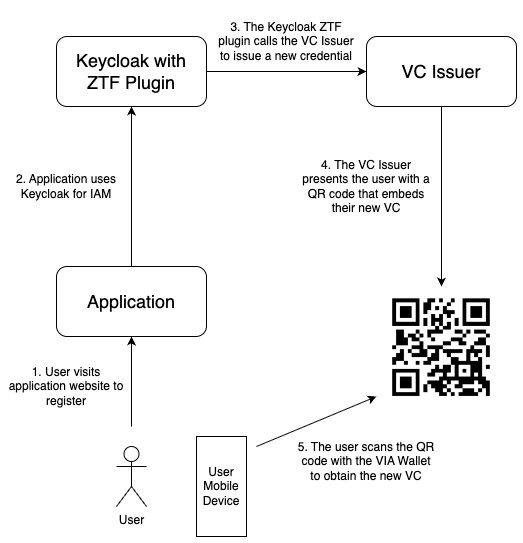
Figure 2: User Registration Diagram
Application Login
This architecture diagram shows the login process for a user accessing an application using a VC to authenticate. The flow integrates a traditional identity management system (Keycloak) with a decentralized verification service.
Step-by-Step Breakdown
- User Visits Application: The process begins with a user visiting an application website to log in.
- Application Uses Keycloak: The application redirects the user's login request to Keycloak for identity and access management (IAM).
- Request Forwarded to FAS: A ZTF Plugin within Keycloak intercepts the login request and forwards it to the Forward Authentication Service (FAS). This is a key step where the authentication flow is handed off to the service that handles VC verification.
- FAS Caches User Info: The FAS temporarily stores the user's login session and relevant attributes in a Postgres DB. This allows the FAS to keep track of the user's authentication request while the VC verification is in progress.
- FAS Requests Verifiable Presentation (VP): The FAS generates a request for a VP and presents it to the user in the form of a QR code. The VP is what the user's digital wallet will create and send to prove their identity without revealing unnecessary details.
- User Scans QR Code: The user scans the QR code with their VIA Wallet on their mobile device. The Wallet then generates and sends the requested VP.
- VP is Sent to Verifier: The VP created by the user's wallet is sent to the Verifier. This Verifier is an entity that is trusted to cryptographically check the VP.
- Verifier Sends Result: The VP Verifier validates the VP and sends the verification result back to the FAS. The result confirms if the VC is authentic and untampered.
- FAS Notifies Keycloak: Based on the successful verification result from the Verifier, the FAS notifies Keycloak to grant access to the user.
- User Granted Access: Keycloak receives the notification and grants the user access to the application. The user is now logged in.
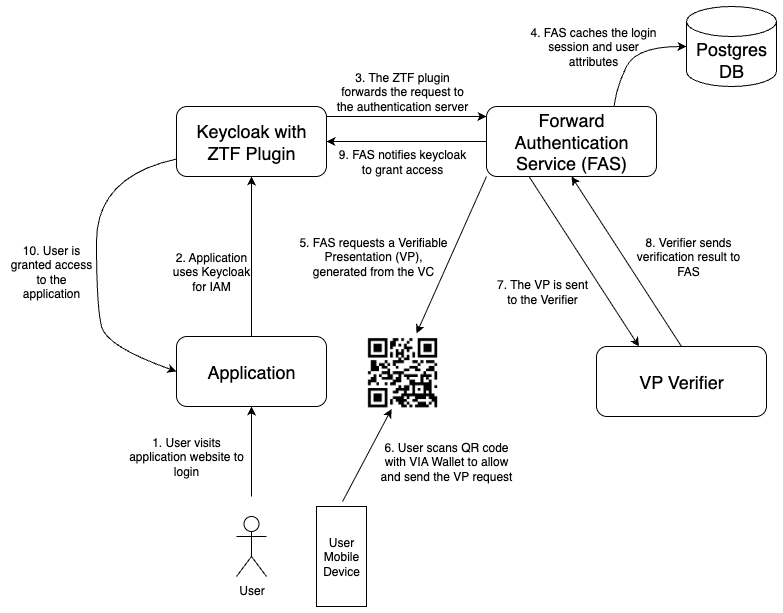
Figure 3: User Login Diagram